
February 1, 2026
From zero to hero: continuously improving your agent in Helpmaton
A pragmatic journey from your first agent to a reliable system, using prompt iteration, tools, evals, and guardrails to improve quality without slowing down.

Building your first agent feels great. You give it a role, it answers a few questions, and you think, “We are done.” Then the real world shows up. The agent drifts, a tool returns messy data, edge cases pile up, and costs get hard to predict.
This is the moment most teams feel stuck. Should we add more tools? Rewrite the prompt? Split the agent? The answer is not one big change. The answer is a repeatable loop.
In Helpmaton, I see the same progression work again and again. You start small, improve the prompt, add only the tools you need, measure quality with evals, and put guardrails in place. That is how an agent goes from zero to hero.
Below is a practical path you can follow.
Level 0 to Level 1: ship a tiny agent that solves one job
Start with a single, narrow responsibility. “Weekly research brief” is better than “research everything.” “Support triage” is better than “support agent.”
Your first prompt should be short and specific. It needs three ingredients:
- Role: what the agent is and what it is not.
- Boundaries: what to refuse or ask clarification on.
- Definition of done: what a good output looks like.
Here is a minimal example for a weekly research brief:
- Role: “You summarize new product updates for our team.”
- Boundaries: “If you cannot find credible sources, say so.”
- Done: “Return a 5-bullet summary with links and one sentence per bullet.”
You can build this in minutes and test it immediately in Helpmaton. Do not overthink the first version. The goal is speed and learning, not perfection.
Level 2: improve behavior with prompt iteration (before adding tools)
Most early failures are prompt failures, not tool failures. If the agent is too verbose, inconsistent, or confidently wrong, fix that before you reach for more integrations.
Use this quick checklist:
- Too verbose: add a length budget or a max bullet count.
- Too confident: add a “state uncertainty” rule.
- Inconsistent format: include a strict output template.
- Misses context: add two or three concrete examples.
- Asks the wrong questions: add a rule for when to ask clarifying questions.
This is still fast, and it keeps the system simple. In Helpmaton, you can iterate on the prompt and test it right away in the same workspace. I recommend doing this in short loops: change one thing, test three to five cases, keep the improvement, repeat.
Level 3: add the right tools (make it useful, not noisy)
When the prompt is solid, the next limitation is data. The agent is only as good as the information it can access. This is where tools matter, but the principle is simple: add tools only when the agent’s job requires them.
Common progressions in Helpmaton:
- Knowledge base search for FAQs, specs, or internal docs.
- Memory so the agent remembers past preferences or facts.
- Web search for fresh or external information.
- Notifications for Slack, Discord, or email.
- Webhooks when you want to integrate the agent into your product.
The win is not “more tools.” The win is “the right tools.”
A helpful rule: if the agent does not need a tool to do its job, do not enable it. Fewer tools means fewer mistakes, lower costs, and clearer behavior.
Level 4: measure quality with Judge evals (stop guessing)
Once the agent is doing real work, you need a way to measure quality. Without evals, you are guessing. With evals, you have a feedback loop.
Judge evals in Helpmaton let you score conversations against a rubric. Here is a simple recipe:
- Define your rubric: helpfulness, accuracy, and format are a great start.
- Run evals before and after changes: compare results, not feelings.
- Sample when needed: evaluate a subset of traffic to control cost.
This does two things. First, it gives you confidence that a change is an improvement. Second, it catches regressions before they reach users.
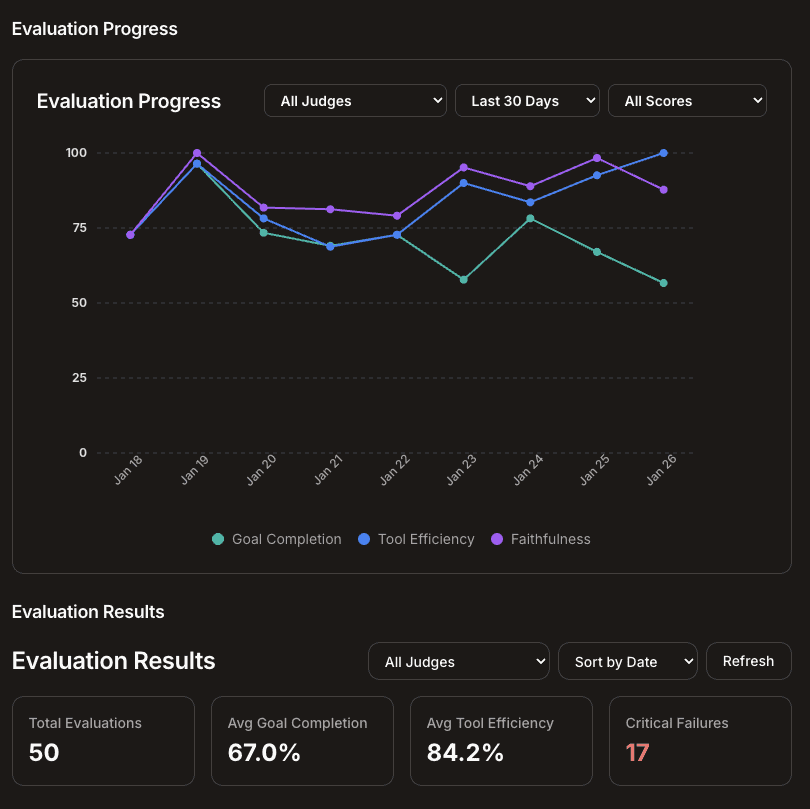
If you only adopt one habit from this article, make it this: every time you touch a prompt or tool, run evals on representative cases. That is how you move fast without breaking trust.
Level 5: production hardening (predictability)
Quality is necessary, but predictability is what makes agents safe to scale. This is where guardrails and architecture matter.
Add cost guardrails early
Set spending limits per agent and per workspace. Track usage by day and by agent. This gives you two wins: no surprises and clear visibility when costs start to drift.
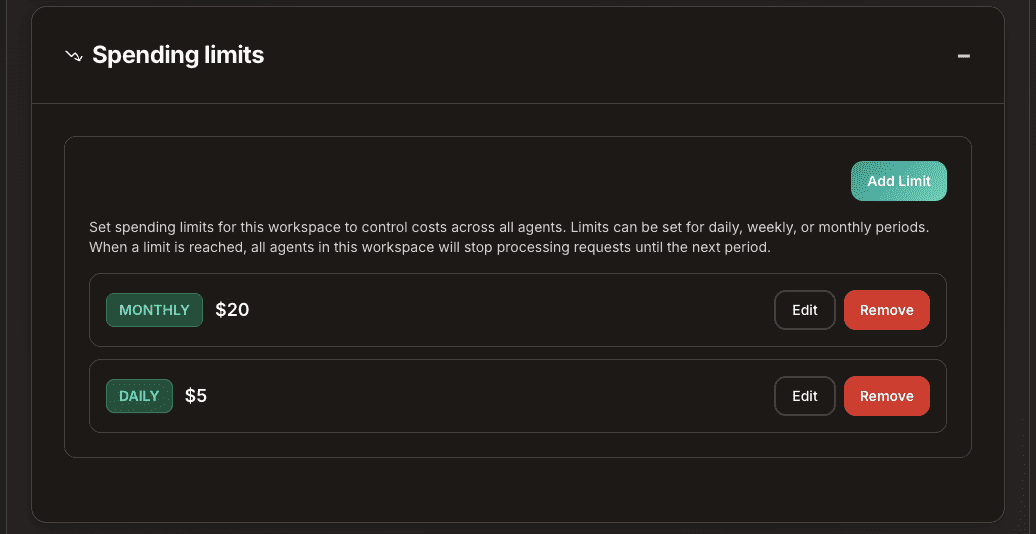
If you need more depth on this, I wrote a full guide on controlling agent costs with caps, analytics, and model choices: Control Agent Costs Without Slowing Your Team Down. The short version is: guardrails let you scale without fear.
Split into micro-agents when a single prompt gets heavy
When an agent starts doing too much, split it. This is the easiest way to reduce context rot and improve reliability.
A simple pattern looks like this:
- Router: classify requests and pick the right specialist.
- Specialist: handle the core task with a tight prompt.
- Writer: polish and format the response for the final audience.
In Helpmaton, agents can delegate to each other inside a workspace. This makes micro-agent architectures practical, not theoretical. If you want the deeper dive, see Micro-agents: Building Smarter AI Systems Through Focused Collaboration.
The loop that takes you from zero to hero
The progression is not a one-time migration. It is a loop you can repeat every time the scope grows:
- Start small with a tight job.
- Iterate the prompt until behavior is consistent.
- Add only the tools the job requires.
- Measure quality with evals.
- Add guardrails and refactor when needed.
This is how teams build agents that are not just impressive demos, but reliable systems that improve over time.
If you want to follow this path, create a workspace, build your first agent, and run the loop. You will see the improvement quickly.
Ready to get started? Create your first agent.